What is the real cost of waiting on AI? Discover how mid-market companies lose hundreds of thousands annually in labor overhead and operational efficiency.

Protect your revenue by following a structured maintenance plan for your ecommerce website. Discover the essential steps to secure customer data and improve site reliability.
Running a successful online store requires more than just a great product launch. The digital landscape changes fast, and staying ahead means keeping your platform fast, secure, and user-friendly. High-performing stores focus on consistent technical health to ensure they do not lose customers to slow load times or broken checkout processes. To maintain your site efficiently, you must treat it as a living asset. This involves regular audits, security patches, and performance tuning. When you focus on these core areas, you create a reliable experience that encourages repeat business and keeps your operations running without unexpected downtime.
Site speed is a primary factor in whether a visitor stays or leaves. Research consistently shows that even a one-second delay in page load time can lead to a significant drop in conversions. To maintain peak performance, you should regularly compress large images and clean up unnecessary code or plugins that might be dragging your system down. Caching is another vital tool. By implementing server-side caching, you reduce the load on your database, allowing pages to load much faster for returning visitors. You should also use a Content Delivery Network to serve your site from servers closest to your users. This is especially important for an ecommerce website that serves a global audience. Technical debt accumulates when you ignore small errors over time. These small issues can eventually lead to a total site crash during high traffic periods. Efficient maintenance means catching these errors before they impact the user. You should use tools to monitor your server response times and ensure that your hosting plan still meets your current traffic levels. If your site has grown significantly, it might be time to move from shared hosting to a dedicated or cloud-based solution.
Security is the foundation of trust in online retail. Since you handle sensitive payment information, your maintenance routine must include frequent security scans. Always keep your core platform and any third-party integrations updated to the latest versions. Hackers often exploit known vulnerabilities in outdated software. Beyond updates, ensure your SSL certificates are valid and that you are using secure payment gateways. Regular backups are also non-negotiable. If something goes wrong during an update or a technical glitch occurs, having a recent backup allows you to restore your store quickly with minimal data loss.
You should also implement two-factor authentication for all administrative accounts. This adds an extra layer of protection against unauthorized access. Additionally, review the permissions of your team members. Only give access to the parts of the website that a person actually needs for their job. This limits the potential damage if an individual account is compromised. Security is not a one-time setup but a continuous process of monitoring and improvement.
A clean and intuitive layout helps customers find what they need without frustration. Over time, links can break, and navigation menus can become cluttered. Part of your maintenance should include a monthly walkthrough of your own site. Test the search functionality, check that all buttons work, and ensure the checkout flow is seamless on both desktop and mobile devices. If your store feels outdated, it might be time to look into custom website design ecommerce solutions. A tailored design allows you to remove the bloat often found in generic templates, resulting in a faster and more unique shopping experience. Refreshing your ecommerce website design ensures that your brand remains modern and competitive in a crowded market.
User experience also includes the quality of your site search. If a customer searches for a product and gets zero results because of a typo, you have lost a sale. Modern maintenance involves optimizing these search parameters to include synonyms and common misspellings. You should also check your 404 error pages. Instead of a dead end, these pages should offer a way back to your homepage or suggest popular products to keep the user engaged.
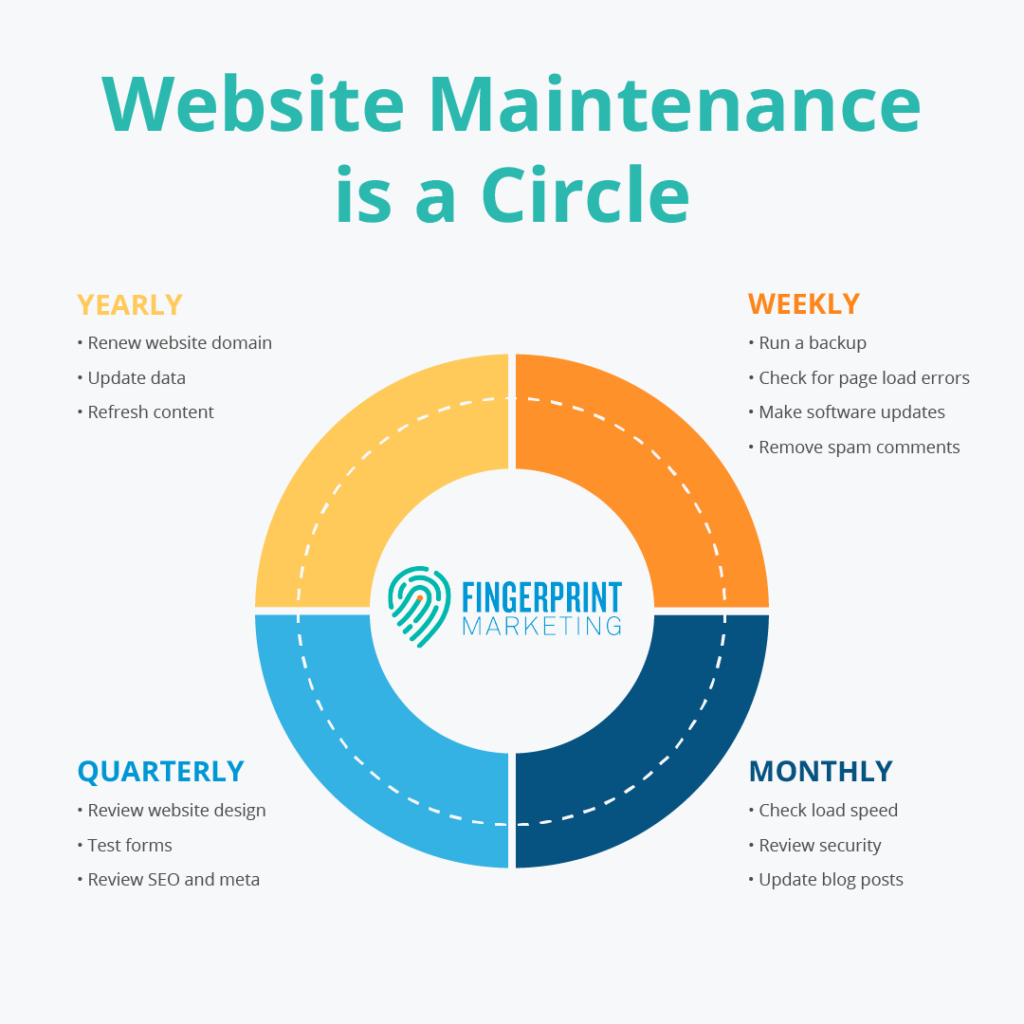
Your product pages are your digital storefront windows. Outdated information, missing images, or out of stock labels on discontinued items can hurt your credibility. Set aside time each month to audit your catalog. Update descriptions to reflect current features and ensure that your pricing is accurate across all categories. Content maintenance also extends to your blog and help sections. Fresh content signals to both users and search engines that your business is active. If you have older articles that are still getting traffic, update them with new insights or internal links to your latest products. This keeps your information relevant and useful for your audience.
High-resolution photos and videos are great for sales, but they can be a major cause of slow performance if not managed correctly. As part of your maintenance, check that all new media is optimized for the web. Use modern file formats like WebP, which offer high quality at a fraction of the file size of traditional JPEGs. Consistent branding across all visuals also helps in building a professional image. If you are using custom website design ecommerce elements, make sure your new product photography matches the established aesthetic. This visual harmony makes your store look more reliable and established.
You cannot improve what you do not measure. Use your analytics dashboard to track how users are interacting with your site. Look for pages with high bounce rates, as these usually indicate a technical issue or a lack of relevant information. Monitoring these metrics allows you to make data-driven decisions rather than guessing what needs to be fixed. Efficient maintenance also means checking how your site appears in search results. Ensure that your meta titles and descriptions are compelling and that your site structure remains easy for search engines to crawl. By keeping your technical SEO healthy, you protect your organic traffic and ensure that new customers can continue to find you easily.
Pay close attention to your conversion rate. If your traffic is high but sales are low, there may be a friction point in your checkout process. Maintenance includes testing different versions of your call-to-action buttons or simplifying the checkout forms. Sometimes, reducing the number of fields a customer has to fill out can significantly increase your successful orders. Continually refining these details is what separates a basic store from a market leader.
To save time and reduce human error, use automation tools for repetitive tasks. Many platforms allow you to schedule automated backups and security scans. You can also use uptime monitoring services that alert you immediately if your site goes offline. Automation can also help with inventory management. Syncing your warehouse data with your online store prevents you from selling items that are no longer in stock, which saves your customer service team from having to process refunds and apologies. The more you automate the behind-the-scenes work, the more time you have to focus on growing your brand.
Email marketing automation is another area where efficiency can be improved. Set up automated triggers for abandoned carts or post-purchase follow-ups. While these are marketing tasks, their maintenance involves checking that the links in these emails are still active and that the discount codes are still valid. Keeping these automated flows healthy ensures you are capturing every possible revenue opportunity without needing to manually intervene every day.
More than half of all internet traffic now comes from mobile devices. If your store is difficult to navigate on a smartphone, you are losing a massive portion of your potential revenue. During your maintenance checks, always prioritize the mobile version of your site. Ensure that text is readable without zooming, buttons are easy to click with a thumb, and pop-ups do not block the entire screen. A high-quality ecommerce website must be fully responsive. If your current theme struggles with mobile performance, investing in a professional ecommerce website design update can solve these layout issues permanently.
In addition to mobile testing, you should check how your site looks on different web browsers. A site might look perfect on Chrome but have layout issues on Safari or Firefox. Regular cross-browser testing ensures that every customer has the same high-quality experience regardless of the device or software they use. This attention to detail reflects the professionalism of your brand and reduces the risk of lost sales due to technical display errors.
Success in the digital marketplace requires a platform that is as ambitious as your business goals. Resolve Digital engineers high-performance retail environments designed for scale and stability. Our team specializes in bridging the gap between complex technical requirements and intuitive user experiences, ensuring your store remains a powerful engine for revenue. We are committed to helping you navigate the ever-changing landscape of online commerce with precision and strategic insight. Whether you need a complete architectural overhaul or a focused performance boost, we provide the expertise to turn your vision into a reliable reality. To help you identify the best path forward for your brand, we offer a complimentary call to discuss your specific needs and uncover new opportunities for growth.
The right partnership can help you elevate your online presence and grow your business by attracting your dream customers. Whether you're looking to develop a luxury eCommerce store from scratch, improve your existing site, or migrate to a different platform, Resolve Digital can help you succeed. Get in touch to learn more about our end-to-end eCommerce services!